
Updated November 2026
Quick answer
Yes, you can motorize a Clicgear 4.0 without replacing it. The simplest Clicgear electric conversion is a clip-on power-assist wheel like the Caddie Wheel (our product): you fit the Clicgear 3.5+/4.0/4.5 bracket kit once, then clip the 15 lb drive wheel on before each round and pull it off before you fold the cart. It costs $749, adds a 4-speed remote and handles 36+ holes per charge.
The Clicgear 4.0 is one of the most common push carts you will see on any walking course. It is sturdy, folds into a compact cube and rolls well on its big airless tires. What it does not do is climb hills for you. If you love your Clicgear but the back nine is starting to feel long, a Clicgear electric conversion is usually a better move than buying a whole new electric cart. This guide explains which Clicgear models can be motorized, what the conversion involves step by step, what it costs compared with a dedicated electric caddy, and the mistakes we see most often.
Full disclosure: we make the Caddie Wheel, a power-assist wheel designed in Montreal for golfers who want to keep their existing push cart. We will be clear about where it fits and where a different product would suit you better.

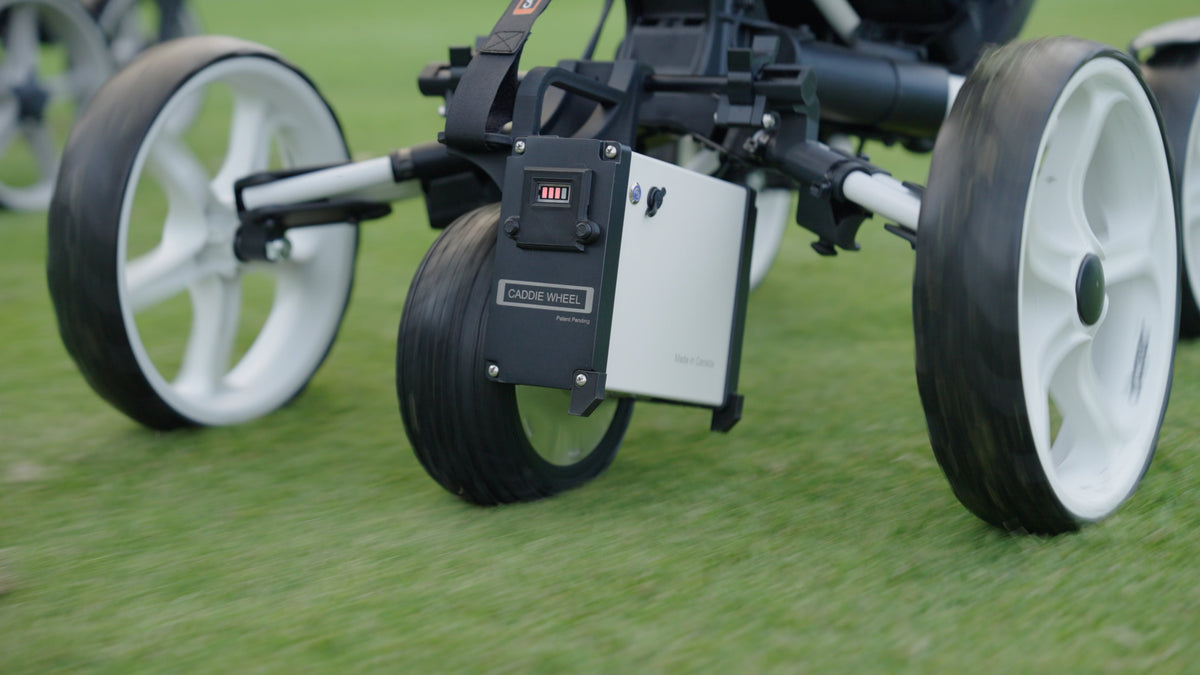
The Caddie Wheel sits between the rear wheels and pushes the cart forward. Your cart's own wheels, frame and brake stay exactly as they are.
Can you motorize a Clicgear 4.0?
Yes. The Clicgear 4.0 is on our compatible carts list, and it shares one bracket kit with the Clicgear 3.5+ and the newer Clicgear 4.5. That matters if you are buying used or are not sure which version you own: any of those three takes the same Caddie Wheel variant, labelled "Clicgear 3.5+ / 4.0 / 4.5" on the Caddie Wheel product page.
Other Clicgear models are covered too, but with different kits:
| Clicgear model | Can it be motorized with a Caddie Wheel? | Bracket kit to choose |
|---|---|---|
| Clicgear 3.5+ | Yes | Clicgear 3.5+ / 4.0 / 4.5 |
| Clicgear 4.0 | Yes | Clicgear 3.5+ / 4.0 / 4.5 |
| Clicgear 4.5 | Yes (also sold as a bundle) | Clicgear 3.5+ / 4.0 / 4.5 |
| Clicgear 1.0, 2.0, 3.0 | Yes | Clicgear 1.0, 2.0, 3.0 |
| Clicgear 8.0+ (4-wheel) | Yes | Clicgear 8.0+ |
| Clicgear Rovic RV1S | Yes | Clicgear Rovic RV1S |
If your cart is a Clicgear model that is not in this table, do not try to force a kit onto it. Installing a bracket on a cart that is not on the compatible list voids the warranty and can damage the kit, the wheel or the cart. Ask us first; the list is updated as new carts are tested.
What does a Clicgear electric conversion actually involve?
There are two broad ways to put a motor on a Clicgear: a clip-on power-assist wheel, or a twin-motor kit that replaces the cart's rear wheels. We compare those approaches in detail in our guide to which push carts can be motorized. Here we focus on the clip-on route, because it is the one most Clicgear owners choose and the one we know inside out.
A clip-on conversion has three parts:
- The bracket kit. A cart-specific mount that attaches to your Clicgear's frame. It is included with the Caddie Wheel, and on a 4.0 you install it once and leave it on.
- The drive wheel. The Caddie Wheel itself: an 8-inch wheel with a 250W motor and a 36V lithium-ion battery built in. It weighs about 15 lb (6.8 kg) and clips into the bracket.
- The remote. A 4-speed LCD remote with forward, reverse and brake. It sits in a holder on the handle so it is always within reach.
Nothing about your Clicgear's own design changes. You keep its front wheel, its hand brake, its console and its fold. The drive wheel simply adds push from behind.
How to motorize a Clicgear 4.0, step by step
Every cart has its own installation guide on our Getting Started page, including a dedicated PDF for the Clicgear 1.0 to 4.0 family. Read it with the cart in front of you. Here is what the process looks like from start to finish.
- Unbox and charge. Plug in the Caddie Wheel and the remote before you do anything else. The charger light is red while charging and turns green when the battery is full.
- Open the Clicgear fully. Unfold the cart and lock it open on a flat floor, like a garage or driveway, so it stands square while you work.
- Fit the bracket kit. Follow the Clicgear guide to attach the bracket to the frame. This is the only part that takes some care, and you only do it once. If anything is unclear, our team will walk you through your first install for free, and we can arrange for a technician if you need hands-on help.
- Clip on the Caddie Wheel. Once the bracket is on, attaching the wheel takes under five minutes, and much less once you have done it a few times. The wheel sits between the Clicgear's two rear wheels.
- Pair the remote and mount the holder. Follow the remote pairing guide, then clip the remote holder onto the handle so the remote rides where your hands already are.
- Check the cart tracks straight. Push the Clicgear by hand across a flat surface. If it drifts to one side, the front wheel may need aligning; that is a cart adjustment, and Clicgear can tell you how to do it on your model.
- Test drive at low speed. Start in Lo or Mi. You can start the wheel with the button on its side or just give the cart a gentle push. Walk a flat loop, try a gentle slope with a hand on the handle, then try reverse and the brake.
Most golfers tell us it takes about two rounds to feel completely natural. After that, the routine is short: clip the wheel on in the parking lot, play, and unclip it before folding the cart for the trip home.

The remote holder clips onto the Clicgear handle, so speed, reverse and brake are always under your thumb.
How does a motorized Clicgear feel on the course?
The Caddie Wheel is a power-assist, not a robot. It drives the cart straight ahead at the speed you set, and you guide the handle to steer. There is no follow mode and the wheel does not steer itself. In practice that means you walk with a hand on or near the handle, the way you already do, but without having to push 36 lb of cart and bag up every rise.
A few things Clicgear owners notice right away:
- Hills stop being a chore. The motor does the pushing on climbs. Keep a hand on the handle going uphill, because a cart with a heavy bag can tip back on a steep slope.
- Speed control is simple. Four speeds cover everything from a slow stroll to a brisk walk. We recommend Lo or Mi for most golfers.
- Downhills are controlled. The remote has a brake, and your Clicgear's own front-wheel hand brake still works for parking.
- Range is not a worry. One charge covers 36+ holes, and the battery is rated for about 400 charge cycles. Charge the remote after 18 holes, since it may not last a full 36.
Weather-wise, the battery is water-resistant and fine in light rain, but it is not built for downpours. If the forecast looks wet, pack the wheel's carry bag and plan to pull it off if the rain gets heavy.
Keep your Clicgear, lose the uphill push
The Caddie Wheel comes with the Clicgear 3.5+/4.0/4.5 bracket kit, a 4-speed remote and a 12-month warranty, for $749. Right now it also ships with a free carry bag, remote holder and portable remote charger. Don't own a Clicgear yet? Get MyGolfSpy's 2026 runner-up cart and the wheel together.
Shop the Caddie Wheel Or get the Clicgear 4.5 bundle ($949) →
How much does a Clicgear electric conversion cost?
If you already own a Clicgear 4.0, the conversion costs $749 for the Caddie Wheel, with the bracket kit included. That is the whole bill. There is no separate battery, charger or installation fee.
Compare that with selling your Clicgear and buying a dedicated electric caddy. In MyGolfSpy's 2026 electric push cart buyer's guide, the Best Overall Alphard Cybercart is listed at $1,379 and the Motocaddy M7 Remote at $1,699. Those are excellent carts, but you are paying for a whole new chassis when you already own a good one.
To be fair to the alternatives, here is where each one wins:
| Option | Price (US) | Best for | Trade-off |
|---|---|---|---|
| Caddie Wheel on your Clicgear 4.0 (ours) | $749 | Keeping the cart you like, easy hills, remote speed control | You steer with the handle; remove the wheel to fold |
| Clicgear 4.5 + Caddie Wheel bundle (ours) | $949 | Golfers starting from scratch who want a top-rated cart | Same as above |
| MGI E-Boost | $599 | Lowest-cost power assist (MyGolfSpy Best Value) | A separate cart, so you give up your Clicgear |
| Alphard Cybercart | $1,379 | A complete remote e-cart (MyGolfSpy Best Overall) | About double the cost of converting |
| Stewart Q Follow | $2,800 | Hands-free follow mode (MyGolfSpy Best Follow) | Highest price of the group |
If you want a cart that follows you around hands-free, a converted Clicgear is not that, and a follow cart like the Stewart is the right tool. If you want the cheapest possible power assist and do not mind replacing your cart, the MGI E-Boost is worth a look. If you want to keep the Clicgear you already trust and just take the work out of the hills, converting it is the most direct and affordable route. For a deeper head-to-head with the main twin-motor kit, see our Caddie Wheel vs Alphard Club Booster comparison.
Should you convert your 4.0 or buy a Clicgear 4.5 bundle?
If your Clicgear 4.0 is in good shape, convert it. The wheel and bracket are the same ones you would get with a new cart, so there is no performance benefit to replacing a healthy 4.0.
The bundle makes sense in a few situations:
- You don't own a push cart yet, or yours is not on the compatible list.
- Your 4.0 is worn out: cracked parts, a sticky fold, or a frame that has taken a few knocks.
- You want the 4.5's upgrades. According to Clicgear's product page, the 4.5 adds a redesigned console with a phone holder and charging cable access, an adjustable drink holder, a storage bag, a mesh basket and an internally routed brake cable. It weighs 21 lb, the same as the 4.0.
- You value a proven cart. The Clicgear 4.5 was the runner-up in MyGolfSpy's 2026 push cart rankings, with testers praising its large wheels, storage and build quality. The main knock was the lack of a swivel front wheel.
The Clicgear 4.5 + Caddie Wheel bundle is $949, which includes the cart, the wheel, the bracket kit and the remote, all ready to go together.

Photo: Markus Spiske on Unsplash
Can one Caddie Wheel power two Clicgears?
Yes. If there are two push carts in your household, you can buy a second bracket kit and move one Caddie Wheel between them. Install a bracket on each cart, then clip the wheel onto whichever cart is heading to the course. This works across most compatible carts, so a Clicgear 4.0 and, say, a Bag Boy Nitron can share a wheel. The exceptions are Sun Mountain and Pathfinder/Micro carts, which cannot share a wheel this way. If you would rather each of you has a powered cart on the same day, you will want two wheels.
Common mistakes when motorizing a Clicgear
- Picking the wrong bracket variant. The 3.5+, 4.0 and 4.5 share one kit; the 1.0/2.0/3.0, 8.0+ and Rovic RV1S each have their own. Check your model before you order.
- Folding with the wheel attached. Always remove the Caddie Wheel before you fold the Clicgear. The bracket can stay on; the wheel cannot.
- Starting in the top speed. Begin in Lo or Mi until you know how the cart responds, especially on slopes.
- Letting go on climbs. Keep a hand on the handle uphill. A loaded cart can tip backwards on a steep grade.
- Ignoring a cart that pulls to one side. The Caddie Wheel drives straight. If the cart drifts, the Clicgear's front wheel probably needs aligning.
- Leaving it in a hot car. Heat can damage the battery and warp plastic parts, and heat damage is not covered by the warranty. Store the wheel somewhere cool and dry.
- Forgetting the remote. The wheel lasts 36+ holes, but the remote may not. Charge it after every 18.
- Installing on an unlisted cart. It voids the warranty. If your cart is not listed, contact us before you try anything.
Pre-round checklist for a motorized Clicgear
- Caddie Wheel charged (green light) and remote charged.
- Bracket kit secure on the frame, with no loose parts.
- Wheel clipped in and locked.
- Remote paired and seated in the holder on the handle.
- Speed set to Lo for the first few holes.
- Carry bag packed in case it rains heavily.
Want to hear from someone who has done it? You can talk to a Caddie Wheel user before you decide, or read what golfers say on our reviews page, where the Caddie Wheel is rated 4.8/5 from more than 500 reviews.
Frequently asked questions
Is the Clicgear 4.0 compatible with the Caddie Wheel?
Yes. The Clicgear 4.0 is on our compatible carts list and uses the "Clicgear 3.5+ / 4.0 / 4.5" bracket kit, which is included when you choose that variant of the Caddie Wheel. The same kit fits the 3.5+ and 4.5, so a Clicgear electric conversion works across all three without extra parts or modifications to the cart.
How long does it take to motorize a Clicgear 4.0?
The bracket kit is a one-time install; follow the Clicgear guide on our Getting Started page and take your time. After that, clipping the Caddie Wheel on takes under five minutes and gets quicker with practice. Most golfers say it takes about two rounds to feel completely comfortable driving the cart with the remote.
Can I still fold my Clicgear 4.0 after converting it?
Yes. The bracket kit can stay on the frame, but you must remove the Caddie Wheel before folding the cart. Unclip the wheel, fold the Clicgear as usual and pack the wheel separately, ideally in its carry bag. The wheel weighs about 15 lb, so it is easy to lift into a trunk on its own.
How far will a motorized Clicgear go on one charge?
The Caddie Wheel is rated for 36+ holes per charge, so a single round barely dents it. The battery is rated for about 400 charge cycles. The remote is the part to watch: charge it after every 18 holes, because it may not last a full 36. A portable remote charger is currently included free.
Does the Caddie Wheel steer my Clicgear or follow me?
No. The Caddie Wheel is a power-assist wheel that drives the cart straight ahead at the speed you choose on the remote. You guide the Clicgear with the handle, the same way you already do. If you want a cart that follows you hands-free, look at a dedicated follow cart such as the Stewart Q Follow instead.
Will motorizing my Clicgear affect the warranty?
The Caddie Wheel has a 12-month warranty when installed on a cart from our compatible list, which includes the Clicgear 4.0. Installing it on a cart that is not on the list voids that warranty. Heat damage, such as leaving the wheel in a hot car, is also not covered, so store it somewhere cool and dry.
Can I use the Caddie Wheel in the rain?
Light rain is fine. The Caddie Wheel's battery is water-resistant and its casing is rust-proof, but it is not designed for heavy downpours or standing water. If the weather turns, unclip the wheel and pack it in its carry bag. Your Clicgear works as a normal push cart in the meantime, so you can finish the round.
Turn your Clicgear 4.0 into an electric caddy
One bracket kit fits the Clicgear 3.5+, 4.0 and 4.5. The Caddie Wheel is $749 with the kit, 36+ holes per charge, a 12-month warranty and free first-install support. Made in Montreal, rated 4.8/5 by 500+ golfers.
Shop the Caddie Wheel Or get the Clicgear 4.5 bundle ($949) →
Share:
Which Golf Push Carts Can Be Motorized? A Brand-by-Brand Guide (2026)