
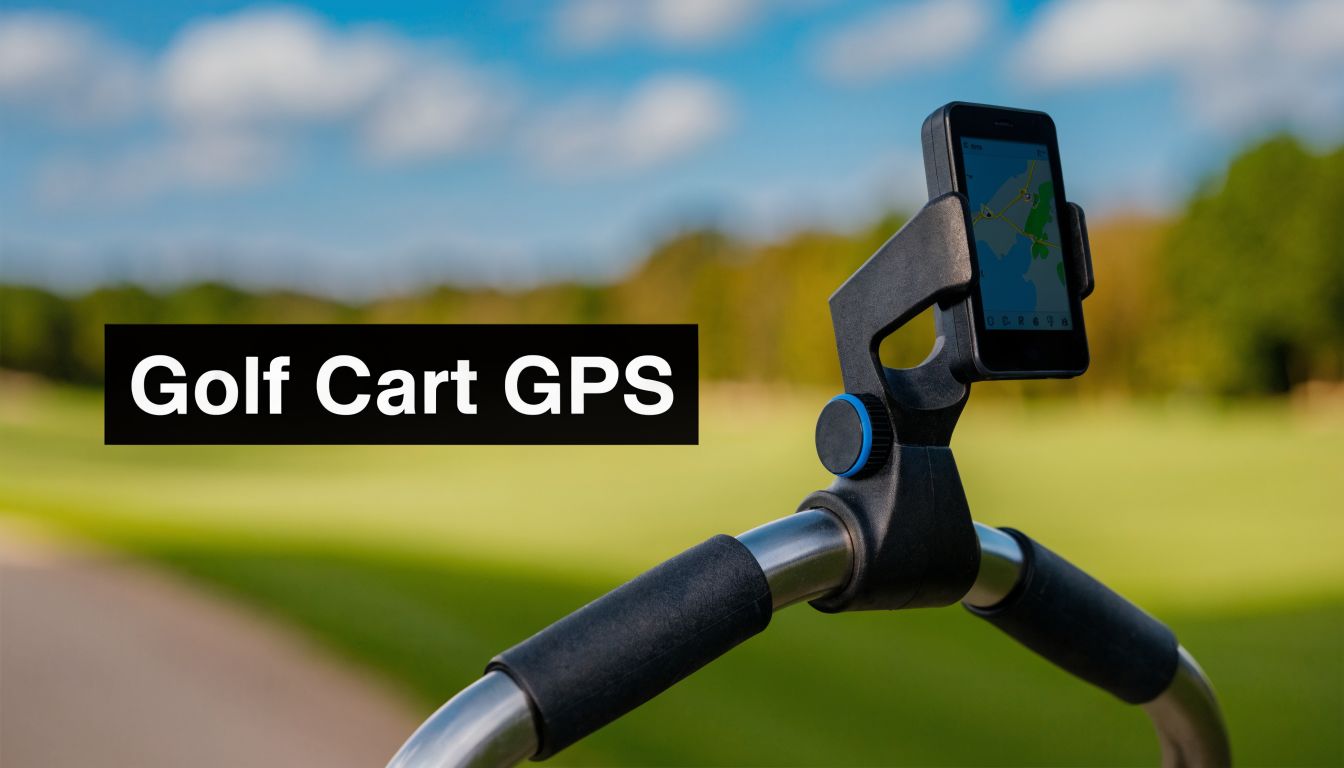
You feel it by the third or fourth hole. The phone comes out of the pocket, the screen is locked, the glove fights the touchscreen, and then the device ends up balanced somewhere it was never meant to sit. On a walking round, that gets old fast.
A proper gps navigation holder fixes more than convenience. It gives your setup a place for navigation that you can glance at, trust, and forget about until you need it. If you use a motorized push cart system, that matters even more. Once power assist enters the mix, the cart stops being just a bag hauler and starts acting more like a small control station. Your yardage, your speed control, and your line of travel all need to work together cleanly.
Most buying guides still miss this use case. Guidance for golf push carts, especially motorized ones, is thin even as electric push cart sales have grown 25% and less than 5% of sampled Amazon GPS holder reviews mention golf use, which points to a real gap in the market and in the advice golfers get (Wrekd product page citing the gap). That gap is why generic car and bike advice often falls apart on the course.
Why a Dedicated GPS Holder is a Game Changer
The biggest upgrade isn't the mount itself. It's what happens to your rhythm.
When the device has a fixed home, you stop patting your pockets before every shot. You stop laying a phone on the console tray, seat, or scorecard shelf and hoping it stays put over a bump. You also stop wasting attention on gear when you should be choosing a club or reading a landing area.
Golfers have pushed technology deeper into the playing experience for years. If you're interested in how immersive tech is reshaping the game beyond the course, How TGL transforms golf is worth a read because it shows how quickly players are getting used to connected, screen-driven decision making. On a push cart, the same principle applies on a smaller scale. Good tech disappears into the round when it's placed correctly.
What changes on the course
A dedicated holder improves three things at once:
- Access: Yardage is visible without stopping and digging for a device.
- Protection: Your phone or GPS unit isn't bouncing around loose next to tees, balls, and rangefinder cases.
- Focus: You take a quick glance and move on.
A gps navigation holder earns its place when you stop thinking about it after the first hole.
That matters more with a motorized setup. Once the cart can move under power, one hand often manages direction or speed while the other handles clubs, towels, or a drink. A secure screen location keeps your navigation visible without adding another awkward motion.
Why generic mounts disappoint golfers
A lot of mounts are designed for smoother, simpler environments. A car dashboard is predictable. A golf push cart isn't. The frame geometry changes by brand, the handle angles differ, and the cart folds. Then you add rough paths, slopes, wet grass, curbs, and the little jolts that happen all round long.
The result is simple. A holder that feels fine indoors can be irritating on the course. It might rotate, block the handle, hit the brake lever, or put the screen in direct sun all day. A golf-ready setup needs to behave like part of the cart, not an accessory hanging off it.
Choosing Your Perfect GPS Navigation Holder
A good holder does more than keep a screen off the turf. On a Caddie Wheel setup, it becomes part of a small control station where yardage, battery management, and remote access all need to work together without crowding the handle.

The buying decision usually comes down to three factors: attachment method, material quality, and fit with both your device and your cart. If one of those is wrong, the whole setup feels improvised on the course.
If you want a baseline on mount styles before translating them to golf, this guide to a magnetic phone mount for car is useful because it shows the same problem golfers deal with. A mount fails once vibration starts shifting the screen out of position.
Start with the attachment method
Clamp mounts are the easy entry point. They suit golfers who want to test positions or move the holder between carts. On course, though, clamp quality matters more than the concept. A wide clamp with a grippy liner holds up much better than a basic plastic ring that relies on friction alone.
Hard-mounted bases take more effort up front, but they usually give the cleaner result. If your push cart has an accessory point or a flat bracket area near the handle, a fixed base is often the better long-term choice for a motorized rig. Less twist, less readjustment, fewer distractions.
Cradles need the same scrutiny. Universal models can work well, but only if the side arms hold firmly and the release mechanism is not flimsy. I prefer holders that keep the phone secure with a case on, because removing the case every round gets old fast and usually means the setup was wrong to begin with.
Material tells you what kind of abuse it can take
Golf carts live through bumps, folding, trunk transport, and weather. Cheap plastic can survive that for a while, but it often loosens at the pivot points first. Aluminum bodies, reinforced joints, and replaceable rubber contact points tend to last longer and stay tighter through a full season.
Standardized mounting patterns are also worth paying attention to, even if you are not building a custom rig on day one. They make it easier to swap from a phone cradle to a dedicated GPS unit later without replacing the whole base. That matters if your Caddie Wheel setup evolves from simple yardages to a more organized cockpit with charging and remote placement dialed in.
Practical rule: Buy the base for stability first, then choose the cradle for the device you actually use every round.
Compatibility is more than device size
A holder can fit your phone and still be a bad match for your cart. The critical test is how it behaves around the rest of your setup.
Check these points before buying:
- Bar shape: Round tubing is easiest. Flat, oval, or angled sections limit your options.
- Case-on fit: Measure with the case installed, not the bare phone.
- Side button clearance: Clamp arms should not press the power or volume buttons.
- Adjustment range: You need enough tilt and rotation to keep the screen readable.
- Accessory spacing: Leave room for a remote holder, scorecard, cup holder, or battery cable if you run powered accessories.
A good reference for golf-first device placement is this golf cart cell phone holder guide, especially if you are deciding whether your cart needs a simple phone cradle or a more purpose-built GPS position.
Choose for the whole handle area, not just the screen
This is the part generic guides miss. Caddie Wheel users are not mounting one device on an empty bar. You are arranging controls. The GPS screen needs to be readable at a glance, the remote needs a natural thumb reach, and any charging cable needs a path that does not snag when you turn, fold, or lift the cart.
That trade-off changes what "perfect" means. The best holder is often not the smallest or the cheapest. It is the one that leaves enough space to create a clean, easy cockpit that works for 18 holes instead of looking tidy in the garage.
Best Practices for Mounting and Securing Your Device
You are on the sixth hole, the cart is tracking well, and the only thing you want from the screen is a quick yardage check. If the holder shakes, slips, or blocks your hand, the whole setup starts to feel clumsy. On a Caddie Wheel build, mounting is not just about keeping a phone attached. It is about building a clean control area that stays readable and easy to use while the cart is moving.
The best mounting point is usually close to the handle, slightly off your main grip path. That position keeps the screen in your eyeline without forcing you to look straight down, and it leaves room for the rest of your handle setup to work properly. Too high, and the device catches more vibration and feels exposed. Too low, and you end up dropping your head for every number.

Find the stable zone
Before you tighten the clamp, test the cart like you would use it on the course. Stand in your normal walking position. Put your hands where they naturally rest. Check whether you can reach the brake, fold point, and any cable runs without fighting the holder.
On many push carts, the center bar looks tidy in the garage but creates problems during the round. A slight offset usually works better because it clears the handle area and gives the screen a more natural glance angle. If you want more placement examples on golf-specific setups, this cell phone mount for golf cart guide is a useful reference.
One quick rule helps here. Mount to the stiffest part of the handle structure, not the most convenient-looking panel.
Tighten for consistent hold
Bad installs usually fail in one of two ways. The clamp is left loose and creeps after a few bumps, or it is over-tightened until the threads, strap, or plastic body start to deform. Both show up on the course fast, especially with a heavier phone case or a larger GPS unit.
Use this sequence:
- Dry fit first: Set the holder in place without fully tightening it.
- Load the device before final adjustment: The angle often changes once the phone or GPS is in the cradle.
- Tighten in small steps: If there are two screws, alternate between them to keep pressure even.
- Roll the cart on rough ground: A short test over a curb edge, cart path seam, or patchy turf will show problems right away.
- Retighten lightly if needed: Small corrections work better than forcing the clamp down hard.
If the mount still rotates after that, the problem is usually the location or clamp match, not your grip strength.
Do the wobble test
I use a simple check before trusting any holder for 18 holes. Grab the handle and shake it side to side the way it moves on a bumpy path. Then walk the cart over uneven pavement and watch the mount, not the screen.
A good setup keeps three things under control:
| Check | What you want | What signals trouble |
|---|---|---|
| Base movement | Base stays fixed to the bar | Clamp creeps or twists |
| Cradle movement | Device stays centered | Device chatters or leans |
| Viewing angle | Screen stays readable | Angle drops after jolts |
Analysts at Touratech describe vibration control as a major part of keeping a GPS readable on rough terrain, which matches what golfers see on cart paths and uneven fairways with direct-mounted devices (direct GPS mount vibration reference).
Later, when you're ready to see a mounted setup in action, this walkthrough is helpful:
Placement mistakes to avoid
A few errors keep showing up on real carts:
- Blocking the fold path: The mount works during the round and becomes a hassle in the parking lot.
- Clamping to a part that already flexes: The holder stays tight, but the bar or panel under it moves.
- Ignoring cable movement: Charging leads need slack, but not so much that they snag when turning or folding.
- Leaving no room to tap the screen: If every touch shakes the holder, the position is wrong.
- Mounting without regard to the rest of the cockpit: A GPS holder has to coexist with remote access, cup holders, and storage, especially on a motorized Caddie Wheel setup.
A good install feels quiet and predictable. That is what you want.
Creating Your Cockpit with the Caddie Wheel Remote
The best motorized push cart setups feel coordinated. Yardage should sit where your eyes naturally go. Speed and direction control should sit where your hand naturally rests. If those two positions fight each other, the round feels cluttered.
One setup that works well for right-handed golfers places the remote on the dominant-hand side and the gps navigation holder just to the opposite side, slightly angled inward. That keeps the thumb free for quick cart input while the eyes catch yardage with a small glance. Left-handed golfers usually prefer the mirror image.

Side by side versus stacked
Side-by-side placement feels natural when the handle area is wide enough. It keeps both controls on one horizontal plane, which many golfers like because it minimizes hand travel. The downside is crowding. If the bars narrow near the grip, the device can feel too close to your hand.
A stacked setup puts the remote lower and the GPS higher, or the reverse. This can create a cleaner lane for your grip and a better screen angle, especially on compact carts.
The right layout is the one that lets you check distance and adjust cart movement without changing posture.
A simple field setup
Think about the moment after you hit your approach. You're walking forward, watching the ball, steering the cart, and checking front-edge distance for the next player. In that sequence, the cockpit should support the round, not interrupt it.
A good arrangement usually follows this logic:
- Primary hand owns motion control: Keep the remote where your thumb can reach it instantly.
- Eyes own navigation: Put the screen slightly above or beside the hand zone, not buried below it.
- Nothing crosses your grip path: Towels, drink holders, and scorecard clips should stay outboard.
If you want a feel for how a motorized cart workflow affects setup decisions, this cart golf manual is useful context.
Braving the Elements with Weatherproofing and Glare Solutions
A gps navigation holder that only works on calm, sunny mornings isn't finished. Golf happens in drizzle, gusts, damp rough, and hard midday light. The holder needs to cope with all of it.
That need is growing more obvious. Golf-specific searches for holders that can survive rain delays and 20-30 mph winds on inclines rose 40% on golf forums in early 2026, pointing to a clear gap between generic mounts and what golfers need on the course (weatherproofing trend note).

Rain protection that actually helps
Start with the device, not the holder. A weather-resistant cradle won't save an exposed charging port or an open speaker grille on your phone. Use a waterproof case if you're relying on a phone for navigation. If you use a dedicated GPS unit, look for a fitted cover that doesn't block the screen corners or charging connection.
Corrosion matters too. Aluminum and stainless hardware usually age better outdoors than cheap plated parts. If your rounds often start in dew or finish in mist, wipe the mount down before storing the cart.
Glare is the hidden problem
Rain gets attention. Sun glare causes more everyday frustration.
The fix isn't complicated:
- Angle the screen down slightly: Straight-up positioning catches too much sky.
- Use an anti-glare protector: It cuts reflections and makes quick yardage checks easier.
- Avoid placing the screen directly above bright accessory surfaces: White towels and glossy scorecards can bounce light back into the display.
For a broader sense of how top-edge shading can improve visibility, it's worth taking a look at discover visor tint benefits. The context is different, but the lesson carries over. Managing overhead light often matters as much as screen brightness.
A readable screen beats a brighter screen if the angle is right.
Troubleshooting and Final Tips for a Flawless Setup
Most holder issues are easy to fix once you know what you're looking at.
If the mount slowly rotates during the round, the clamp probably isn't matching the bar shape. Add a thin rubber shim between clamp and bar, then retighten evenly. If it still rotates, move the holder to a straighter bar section with less taper.
If the screen vibrates enough to blur yardages, the problem is often mechanical advantage. Bring the holder closer to the bar, shorten any extension arm, or switch to a more direct-mount design. In the wider GPS hardware market, reliability matters enough that the global car GPS navigation system market reached USD 1,070 million in 2024 and is projected to reach USD 1,790 million by 2034, and unstable holders can contribute to up to 12% distraction-related accidents according to the same market summary citing NHTSA context (car GPS market and holder reliability). The setting is different, but the lesson applies. A moving screen steals attention.
Quick fixes that work on the course
- If the cradle loosens over 18 holes: Check the pivot joint first. That's often the weak point, not the base.
- If side buttons get pressed by the holder: Shift the phone up or down in the cradle, or switch to a model with adjustable side arms.
- If the device feels secure but the image shakes: Reduce the height of the mount and lower the center of gravity.
- If glare becomes unbearable late in the round: Tilt the screen a few degrees down and inward before chasing brightness settings.
One final habit pays off. Check every fastener before a round, especially after transport in a car trunk or after folding and unfolding the cart several times. Small loosening starts subtly, then shows up on the roughest path of the day.
If you want to turn a standard push cart into a cleaner, easier walking setup, Caddie Wheel is worth a look. It adds lightweight electric power assist to many three- and four-wheel carts, includes a remote and holder, and makes it much easier to build the kind of organized, low-effort cockpit that keeps your focus on golf instead of pushing.
Share:
Top Cup Holder for Golf Push Cart Models Reviewed
Automatic Greasing System: A Complete 2026 Guide