
Your electric golf cart charger is the lifeline for your cart. It’s far more than just a plug; think of it as a sophisticated power supply designed to replenish your battery's energy safely and efficiently. The right charger is a vital tool that protects your battery investment, ensures you’re never stranded on the back nine, and has a direct impact on your cart's overall performance.
Why Your Golf Cart Charger Matters More Than You Think
Across golf courses everywhere, the quiet hum of an electric motor has taken over from the noisy rumble of old gas engines. This isn't just a fleeting trend; it’s a complete shift in how we experience the game. The market for electric golf carts is booming, with projections showing it will climb from USD 2.28 billion to USD 3.39 billion by 2030. This growth is all about the demand for cleaner, quieter transport and huge leaps in battery technology. Today, electric models dominate the scene, holding a massive 81.64% of the market share.
This electric wave isn't just for traditional carts, either. It includes clever power-assist units like the Caddie Wheel, which can turn any standard push cart into a fully motorized caddie. In this new world, your charger is no longer just some accessory—it’s the heart of your entire setup.
Understanding the Charger's Role
A quality electric golf cart charger does a lot more than just pump electricity into a battery. It intelligently manages the power flow, adapts to what the battery needs at different stages, and prevents the kind of damage that can kill a battery early and drain your wallet. Think of it as a personal trainer for your battery.
Using a generic or mismatched charger is like hiring a bad coach; it will push the battery too hard or not enough, leading to premature failure. A smart charger, on the other hand, delivers the perfect "workout" every single time, keeping your battery in peak condition for years. This guide is here to make you an expert on your charging system. To really dive deep into the charging ecosystem, this comprehensive ultieme gids voor elektrisch laden is an excellent resource.
"Your charger is the single most important factor in determining the long-term health and performance of your golf cart's battery. Choosing the right one and using it correctly is non-negotiable for anyone serious about protecting their investment."
We're going to cover everything you need to know to make smart, confident decisions:
- Decoding Technical Specs: We’ll break down what voltage, amperage, and connector types actually mean for you.
- Battery Compatibility: You’ll understand why lead-acid and lithium batteries need completely different charging approaches.
- Maintenance Mastery: Discover the best practices to get the most life out of your battery and sidestep common charging mistakes.
- Troubleshooting Tips: Gain the confidence to diagnose and fix small charging issues on your own.
By the time you finish this guide, you’ll be ready to pick, use, and maintain your charger like a seasoned pro.
Decoding Charger Voltages and Amps
Choosing an electric golf cart charger can feel like trying to read a foreign language. The labels are covered in numbers and symbols—36V, 48V, 15A, 25A—but what do they actually mean for your cart? Let’s break down these technical specs into simple, practical terms you can actually use.
Think of charging your cart's batteries like filling a bucket with a water hose. It’s a simple analogy, but it works perfectly here.
- Voltage (V) is the water pressure. It has to be just right for the bucket (your battery).
- Amperage (A) is the flow rate—basically, how wide the hose is. This decides how fast the bucket gets filled.
If the water pressure (voltage) is too low, you'll never fill the bucket. If it's way too high, you could damage or even burst it. The flow rate (amperage) is all about speed, but pushing too much water too fast can cause its own problems. For a safe and effective charge, you have to get both right.
Understanding Voltage: The Cart's Power System
Of all the numbers on a charger, voltage is the one you absolutely cannot get wrong. It represents the total electrical "pressure" of your golf cart's battery pack. Most golf carts run on either a 36-volt (36V) or a 48-volt (48V) system. The charger you use must match your cart’s system voltage.
Trying to use a 36V charger on a 48V battery system just won't work—it simply lacks the oomph to get the job done. But going the other way is far more dangerous. Hooking up a 48V charger to a 36V system will overwhelm the batteries, causing serious damage and creating a major safety risk. Always double-check your cart's specs or the labels on the batteries themselves to confirm the voltage before you even think about buying a charger.
What Amperage Means for Charging Speed
While voltage is all about compatibility, amperage (amps) is all about speed. The amp rating tells you how much electrical current the charger delivers per hour. A higher amp rating means a faster charge. Simple as that. For instance, a 25-amp charger will juice up your batteries roughly 40% faster than a 15-amp model.
But hold on—faster isn't always better. The right amperage really depends on your battery's capacity and what it can handle. Forcing too much current into a battery that isn't designed for it can create a lot of excess heat, which is a surefire way to shorten its lifespan. This is especially true for specialized, portable units like the one for a Caddie Wheel. You should always stick with the manufacturer-provided charger, as it's perfectly calibrated for that specific battery.
Want to dive deeper into this? Check out our guide on finding the right series battery charger for your setup.
Your charger's voltage must be an exact match for your battery system. Amperage determines the charging speed, but it should always be within the safe range recommended for your specific battery type.
On-Board Versus Portable Chargers
The physical style of the charger matters, too. Traditional golf carts usually use one of two types: a big, standalone portable unit you keep in the garage, or an on-board charger that’s bolted right into the cart.
- On-Board Chargers: These are super convenient because they travel with you. All you need is an outlet and the attached cord to plug in.
- Portable Chargers: These give you a bit more flexibility. You can use them for multiple carts (as long as they share the same voltage) and they're common for smaller systems, like electric power-assist wheels.
The Rise of Smart Charging Technology
Modern golf cart chargers are light-years ahead of the old "trickle chargers" from back in the day. Today’s “smart” chargers are run by microprocessors that act like a babysitter for your batteries, monitoring them throughout the entire charging cycle.
These chargers use a multi-stage process. They kick things off with a high-current "bulk" charge to do the heavy lifting, then ease off the current as the battery gets full. Finally, they switch to a "float" or "maintenance" mode, which delivers just a tiny trickle of power to keep the battery topped off without overcharging it. This is a huge deal, since overcharging is one of the quickest ways to kill a battery. A smart charger prevents this completely, letting you "set it and forget it" with total peace of mind.
Matching the Right Charger to Your Battery
Think of your electric golf cart charger and battery as a dedicated team. For your cart to perform, that partnership has to be perfectly in sync. It's a bit like a quarterback and a receiver—if their timing is off, the play falls apart. A mismatched charger can lead to sluggish performance, a shorter battery life, and even create serious safety risks.
The secret to a great match is knowing your battery's chemistry. The two main players in the golf world are the old-school Lead-Acid and the modern Lithium-ion, and they follow completely different playbooks for charging. Trying to use a charger built for one on the other is just asking for trouble, since their charging algorithms are fundamentally different.
Lead-Acid Versus Lithium-ion Batteries
For years, heavy lead-acid batteries were the standard. They're reliable workhorses, sure, but they come with their share of headaches. They need regular maintenance, don't last as long, and demand a slow, multi-stage charging process to keep from getting damaged. A lead-acid charger is designed to deliver a steady, tapering current over a long haul.
This flowchart is a great visual aid for breaking down the key decisions you'll make when picking out a charger.
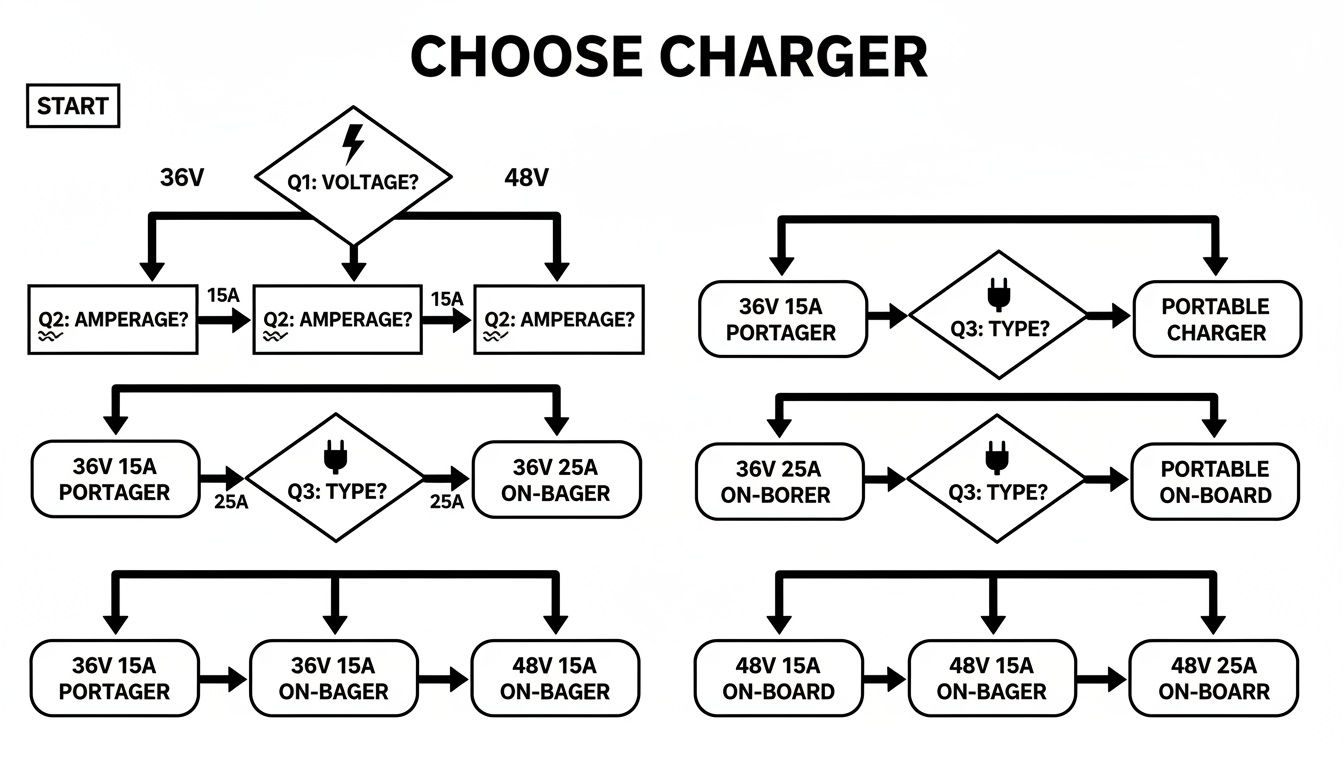
As you can see, the process is pretty straightforward. You start by confirming your system’s voltage, figure out how fast you want to charge with amperage, and then pick a plug type that fits your cart.
Lithium-ion batteries, on the other hand, are the new champions on the course. They’re feather-light, completely maintenance-free, and can handle much faster charging without breaking a sweat. This technology is a game-changer for high-endurance systems like the Caddie Wheel, where cutting down on weight and downtime is everything. A lithium charger is programmed specifically for the higher energy density and unique charging profile these advanced batteries require.
To get a clearer picture of just how different these batteries and their charging needs are, let's break them down side-by-side.
Charger Compatibility Guide for Battery Types
| Feature | Lead-Acid Batteries | Lithium-ion Batteries |
|---|---|---|
| Charging Algorithm | Requires a multi-stage, tapering charge to prevent sulfation. | Uses a Constant Current/Constant Voltage (CC/CV) algorithm. |
| Charging Speed | Slow and steady. Typically takes 8-10 hours for a full charge. | Fast charging. Can reach full capacity in just 2-4 hours. |
| Maintenance | Requires regular watering and terminal cleaning. | Zero maintenance required. |
| Charger Intelligence | Basic voltage and current regulation. | Advanced Battery Management System (BMS) communication is critical. |
| Interchangeability | Cannot be charged with a lithium charger. Risk of overcharging and damage. | Cannot be charged with a lead-acid charger. Risk of undercharging and cell damage. |
This table makes it crystal clear: you can't just grab any charger off the shelf. The technology inside is tailored to a specific battery chemistry, and mixing them up is a recipe for failure.
The performance gap is huge. Lithium-ion batteries now command 47.18% of the market share for a reason—they can complete a full charge in just 2-4 hours and last for up to 6,000 cycles. Compare that to old lead-acid tech, which often needs 8-10 hours to charge and has a much shorter lifespan. That faster charging cuts downtime by as much as 50%, a major win for any serious golfer. Mordor Intelligence offers a great deep dive into these trends in their golf cart battery market report.
The Dangers of a Mismatched Charger
So, what really happens if you use the wrong charger? The consequences range from annoying to downright dangerous.
- Permanent Capacity Loss: Using a lead-acid charger on a lithium battery won't charge it properly and can damage the cells by skipping the correct charging stages. The result is a permanent drop in how much juice the battery can hold.
- Battery Damage: A charger with the wrong voltage or algorithm can cause overheating, swelling, or even internal short circuits. This doesn't just wreck an expensive battery—it's a serious fire hazard.
- Reduced Lifespan: Even if it seems to work at first, the wrong charger puts a ton of stress on the battery's components, slashing its operational life. You'll be shopping for a replacement way sooner than you should be.
To steer clear of these problems, you've got to know your gear. If you're running a lithium setup, you might find our guide on what to look for in a lithium battery charger for a golf cart helpful.
How to Ensure a Perfect Match
Finding the right charging partner for your battery is simple if you just follow a few steps. Your mission is to confirm three key specs before you buy or plug in any charger.
- Confirm Battery Chemistry: First things first, figure out if you have Lead-Acid or Lithium-ion batteries. This info is almost always printed on the battery casing itself or listed in your golf cart's manual.
- Verify System Voltage: Like we covered earlier, your charger's voltage has to be an exact match for your cart's system voltage (36V or 48V). There's absolutely no wiggle room on this one.
- Check the Connector Plug: Different golf cart brands love to use their own unique connector plugs. Double-check that the charger's plug physically matches the port on your cart to get a secure and safe connection.
By meticulously checking these three things, you'll ensure your battery and charger can work together in perfect harmony, giving you reliable power and top-notch performance for years to come.
Charging and Maintenance Best Practices

Owning a top-notch electric golf cart charger is a great start, but it’s only half the equation. Your day-to-day habits are what really determine your battery's lifespan and make sure your cart is always ready for a round. Think of it like a fitness plan—consistency is what delivers long-term health.
A few simple practices will pay off big time, helping you sidestep the most common and expensive battery problems down the road. It all starts with setting up the right environment for your charger to work its magic.
Create the Ideal Charging Environment
Your charger and batteries have a comfort zone. Heat is the absolute worst enemy of any battery, as it speeds up chemical breakdown and can drastically shorten its life. Always try to charge your cart in a space that’s cool, dry, and has plenty of airflow.
Charging in a stuffy, hot garage can cause both the charger and the batteries to overheat. This not only puts a ton of stress on the components but can also create a safety risk. Good ventilation helps get rid of the heat that builds up during charging, leading to a safer, more efficient cycle. In fact, many of the principles for safely installing home EV chargers apply here, too.
Just like an athlete needs a cool-down after a workout, your golf cart batteries benefit from a short break. After a long 18 holes, let your cart rest for about 30 minutes before plugging it in. This gives the battery temperature time to come down, which is much healthier for it in the long run.
Master Your Charging Cycles
How you charge is just as crucial as where you charge. It might seem smart to top off your cart after every quick trip, but that can actually work against you, especially with older lead-acid batteries. The real secret is to let the charger complete a full, uninterrupted cycle.
- Avoid Constant Top-Offs: It’s better to use your cart until the battery is noticeably down (but not totally dead) and then give it a complete charge.
- Let It Finish: Once you plug the charger in, leave it alone until it shuts off automatically. Pulling the plug mid-cycle can mess with the battery's "memory" and chip away at its total capacity over time.
- Never Run It to Zero: Letting your battery die completely is one of the fastest ways to ruin it. This causes permanent damage to the cells in a process called deep discharge. Make it a habit to recharge when you have about 20-30% power left.
For a deeper dive into the specifics, our guide on how to charge a golf cart offers a fantastic step-by-step walkthrough.
Off-Season Storage and Long-Term Care
If you’re putting your golf cart away for the winter or won't be using it for a while, a little prep work makes a huge difference. Just letting a battery sit for months is a surefire way to come back to a dead cart.
Here’s your off-season checklist:
- Clean the Batteries: Before you store it, give the battery terminals and casing a good cleaning. Grime and corrosion can create tiny electrical leaks that slowly drain the battery.
- Give It a Full Charge: Run the batteries through one last, complete charging cycle. A full battery is much more resilient against cold weather and potential damage.
- Use a Battery Maintainer: For any long-term storage, a smart charger or a dedicated battery maintainer is a must. These devices deliver a tiny "float" charge that keeps the battery perfectly topped off without overcharging, preventing sulfation in lead-acid types and keeping lithium cells healthy.
- Check In Monthly: Even with a maintainer, it’s smart to pop in and check on your cart once a month. Just make sure the charger is still connected and running as it should.
Following these simple maintenance steps ensures that when golf season rolls around again, your cart will be in prime condition and ready to hit the course without any surprises.
Troubleshooting Common Charger Problems
Even the best electric golf cart charger has its off days. When your charger seems dead or just isn't working right, don't panic. More often than not, a little detective work can solve the problem without a costly call to a technician. The fix is usually simpler than you think.
Before you start tearing things apart, always start with the absolute basics. You’d be surprised how many “broken” chargers are just suffering from a simple power supply issue. A quick, systematic check can save you a ton of time and frustration.
Start with the Power Source
Your first move, always, is to confirm the charger is actually getting power from the wall. This simple step is the foundation for all other troubleshooting.
- Check the Outlet: Unplug your charger and plug in something you know works, like a lamp or a phone charger. If that device doesn't power on, the problem isn't your charger—it's the outlet.
- Inspect the Breakers: Head over to your circuit breaker panel. Look for any tripped breakers, which will be flipped to the "off" position or stuck in the middle. Flip the correct breaker firmly back to "on."
If both the outlet and the breaker check out, it's time to look at the physical gear in your charging setup.
Inspect All Cords and Connections
Years of being plugged, unplugged, and coiled up can take a toll on cords and connectors, easily interrupting the flow of electricity. A thorough visual inspection is your next critical step.
- Charger Cords: Carefully run your hands along both the AC power cord (the one going to the wall) and the DC cord (the one plugging into the cart). Feel for any cracks, frays, or scary-looking exposed wires. Damaged cords are a super common failure point and a serious safety hazard.
- Plug and Port Integrity: Take a close look at the charger's plug and your cart's charging port. Are there any bent pins, green or white corrosion, or gunk blocking a solid connection? A loose or dirty connection is often enough to keep the charger from activating.
A classic symptom is a charger that clicks on for a second, then immediately shuts off. This can happen if your cart's batteries are too dead. Some chargers have a safety feature that won't let them turn on if they don't detect a minimum voltage from the battery pack.
Interpreting Indicator Lights and Error Codes
Modern chargers try to tell you what's wrong using indicator lights or error codes. Figuring out what these signals mean is the key to your diagnosis. Your charger’s manual is your best friend here, as the codes can be different from brand to brand.
Still, there are a few common patterns you'll see on most models:
- No Lights at All: This almost always screams "power supply issue." Double-check your outlet, breaker, and all the cord connections again.
- Flashing Green Light: This usually means the charger is in a "maintenance" or "float" mode. The battery is full, and the charger is just trickling in power to keep it topped off.
- Flashing Red or Amber Light: This is typically a fault signal. It could be a bad connection, a problem with the batteries, or an internal issue with the charger itself. Your manual will help you decode the specific blink pattern.
- Solid Red Light: This is the one you want to see! It generally means the charger is actively and happily charging your battery pack.
If you’ve walked through all these steps and your charger is still giving you the silent treatment, the problem might be more serious. It could be an internal issue with either the charger or the cart's battery system. At that point, your best bet is to contact a qualified technician for a professional diagnosis.
What's Next for Golf Cart Charging?
The world of electric vehicles is moving at a breakneck pace, and the humble golf cart is right there in the fast lane. The days of just plugging in a cord and hoping for the best are quickly giving way to something far smarter and more convenient. The future of the electric golf cart charger is all about removing the hassle, adding a layer of intelligence, and giving you more control over your cart’s power.
This shift is turning a routine chore into a background process you barely have to think about. Imagine a world where your cart just recharges itself, without you ever touching a plug. That’s not science fiction; it’s the next big leap.
The Dawn of Wireless Charging
The most exciting development on the horizon is, without a doubt, wireless charging. Think of it like the charging pad for your smartphone, just scaled up for your golf cart. This technology uses magnetic resonance to send power from a pad installed in the ground directly to a receiver on your cart. All you have to do is park in the right spot, and the charging starts automatically.
This completely hands-free approach is a true game-changer, especially for big commercial fleets at golf courses or in large communities.
We're already seeing this tech hit the real world. In January 2024, WiTricity and ICON EV launched wirelessly charged carts that completely eliminate manual plugging. In commercial settings, this technology is projected to cut down operator time by as much as 70%—a massive boost in efficiency. You can learn more about these trends in this in-depth golf cart market analysis.
For the everyday golfer, this means no more fumbling with dirty cables or that nagging feeling you forgot to plug the cart in after a round. It’s a clean, simple solution that makes owning an electric cart even more effortless.
Smart Chargers and App Integration
Beyond cutting the cord, the brains inside the charger are also getting a major upgrade. The next generation of smart chargers will connect right to your phone via Bluetooth or Wi-Fi, putting a ton of useful information right at your fingertips.
This kind of connectivity will let you:
- Monitor Real-Time Status: Check your battery’s exact charge level, see how much time is left until it's full, and confirm everything is working correctly—all from an app.
- Get Health Diagnostics: The app can track your battery's long-term health, flagging potential issues like cell degradation before they turn into serious problems.
- Schedule Charging Times: You’ll be able to tell your charger to run only during off-peak electricity hours, which can save you a nice chunk of change on your utility bills.
This tech turns the charger from a simple power cord into a proactive battery management system. By giving you clear, actionable data, these smart systems will help you squeeze more life out of your battery and guarantee your cart is always ready for the first tee.
Frequently Asked Questions
When it comes to electric golf cart chargers, a few common questions always seem to pop up. Getting straight answers is the best way to make smart choices and take better care of your cart. Let's tackle the questions we hear most often from fellow golfers.
Can I Use Any Charger for My Electric Golf Cart?
That's a definite no. Grabbing the wrong charger is one of the quickest—and most expensive—mistakes you can make with your golf cart.
Your charger needs to be a perfect match for two things: your cart's system voltage (usually 36V or 48V) and the specific battery chemistry (Lead-Acid or Lithium-ion). Using an incompatible charger can permanently damage your batteries, slash their lifespan, or even create a serious safety risk. Always double-check your battery specs and pick a charger built for that exact system.
How Long Does It Take to Fully Charge a Golf Cart?
This depends on a few things, like how drained the battery is, what kind of battery you have, and the amp output of your charger. Still, there are some solid rules of thumb you can go by.
- Lead-Acid Batteries: These old-school workhorses generally take about 8-10 hours to go from empty to full.
- Lithium-ion Batteries: The newer lithium batteries are way faster, usually finishing a full charge in just 2-4 hours.
A charger with a higher amp rating will speed things up, but you have to make sure that amperage is within the safe range your battery manufacturer recommends.
Is It Okay to Leave My Golf Cart Plugged In All the Time?
This is a great question, and the answer hinges entirely on what kind of charger you're using. The big difference is between older manual chargers and modern "smart" chargers.
Most modern "smart" chargers are designed to be "set it and forget it." They charge the battery to full, then automatically shut off and switch to a maintenance or "float" mode. This mode provides a tiny, safe trickle of power to keep the battery topped off, which is not only safe but actually good for battery health.
If you’re working with an older, manual charger that doesn't have these smarts, you must unplug it once the charge cycle is done. Leaving it connected will overcharge the battery, which can boil the electrolyte in lead-acid batteries and cause permanent damage.
How Can I Tell if My Golf Cart Charger Is Working?
When you plug your charger in, you should see some clear signs that it's doing its job. A healthy charger will usually give a little "click" when it starts, and its indicator lights will turn on to show the charging status.
If your charger has an ammeter (a needle gauge), you'll see the needle jump up when you first connect it, then slowly fall back toward zero as the battery pack gets closer to full. It’s also perfectly normal for the charger to get a bit warm while it's working.
Big red flags to watch out for are the charger getting scorching hot, making a loud buzzing noise, or the indicator lights failing to come on or showing an error. If you spot any of these signs, unplug it right away and start troubleshooting, beginning with your outlet and connections.
Ready to upgrade your game and walk the course with ease? The Caddie Wheel delivers powerful, lightweight electric assistance that attaches to your existing push cart in minutes. Experience the difference and shop now at caddiewheel.com.
Partager:
Mastering Your Electric Motor Remote Control Golf Cart
A Golfer's Guide to Golf Carts and Batteries